Article
Livestreaming · 6 min read
A multi-camera setup can transform the quality of a livestream.
Instead of presenting an entire event from one fixed angle, multiple cameras allow the production team to show the speaker, the wider venue, audience reactions and other important moments as they happen.
But simply adding more cameras does not automatically make a livestream professional.
From my experience working with multi-camera conference productions, including setups involving up to six cameras, I have learned that the real difference comes from how those cameras are planned, positioned and switched during the live programme.
The objective is not to change cameras frequently.
The objective is to show the audience the right shot at the right moment.
What Is Multi-Camera Livestreaming?
Multi-camera livestreaming uses two or more camera sources within a single live production.
Those camera feeds are brought into a central production system, where the person controlling the broadcast decides which camera or scene should be shown to the audience.
Software such as vMix or OBS Studio can form part of this workflow, while larger productions may use dedicated video switching and broadcast systems.
The basic concept is simple.
The difficulty is making all those sources work together as one coherent production.
Every Camera Should Have a Purpose
Before adding cameras to a production, there should be a reason for having them.
For a conference, for example, one camera might provide a wide shot of the stage and venue. Another might concentrate on the main speaker. Additional cameras can provide close-ups, side angles, audience reactions or coverage of other important areas.
The exact arrangement depends on the event.
What matters is that the production team understands what each camera is expected to contribute.
This becomes increasingly important as the number of cameras grows.
In a six-camera production, for example, six available feeds create many choices for the person controlling the broadcast. Without proper planning, those choices can easily become a distraction rather than an advantage.
Camera Switching Should Follow the Event
One of the most important lessons in multi-camera production is that switching should follow what is actually happening in real time.
When a presenter or speaker is talking, the main focus will naturally be on that person. But the programme does not stop there.
Something may happen elsewhere in the venue. Another participant may begin speaking. The audience may react. A presentation may appear. Someone may approach or leave the stage.
The person controlling the production needs to follow these developments and decide what the online audience should see.
This is where live production becomes different from simply operating equipment.
You are making editorial and visual decisions in real time.
Every Camera Change Should Have a Reason
A common mistake I see in multi-camera livestreaming is random camera switching.
Someone has several cameras available, so they feel that they need to keep changing between them.
Camera 1.
Camera 2.
Camera 3.
Back to Camera 1.
Then another camera.
But there may be no visual or editorial reason for those changes.
This can make the production feel restless and unprofessional.
A useful principle is:
Every camera change should have a reason.
Switch because another camera provides a better view of what is happening.
Switch because the focus of the programme has changed.
Switch because the audience needs context.
Switch because another shot communicates the moment better.
Do not switch simply because another camera is available.
More Cameras Do Not Automatically Mean Better Production
It is easy to assume that six cameras will always produce a better livestream than three.
That is not necessarily true.
A well-planned three-camera production can be more professional than a poorly managed six-camera production.
As cameras increase, other requirements also increase.
You need more operators or more carefully positioned unmanned cameras. You need additional video inputs and signal paths. Monitoring becomes more important. Communication becomes more complicated. The person switching the programme has more sources to follow.
This means the question should not simply be:
How many cameras can we use?
A better question is:
How many cameras do we need to cover this programme properly, and can we manage them effectively?
Think About the Audience, Not the Equipment
During a livestream, the production team may be surrounded by cameras, computers, monitors, cables and other technical equipment.
The audience does not care about most of that.
They care about what appears on their screen.
The job of the production team is therefore to think from the viewer's perspective.
If someone important begins speaking, can the viewer see them clearly?
If something significant happens in the hall, are we able to show it?
If a presentation becomes the focus, does the broadcast reflect that?
The technology exists to help tell the story of the event.
It should not become the story itself.
The Importance of Monitoring
Multi-camera switching requires attention.
When several sources are available, the person controlling the broadcast needs to know what is happening across those cameras before selecting the next shot.
This is why monitoring is an important part of professional production.
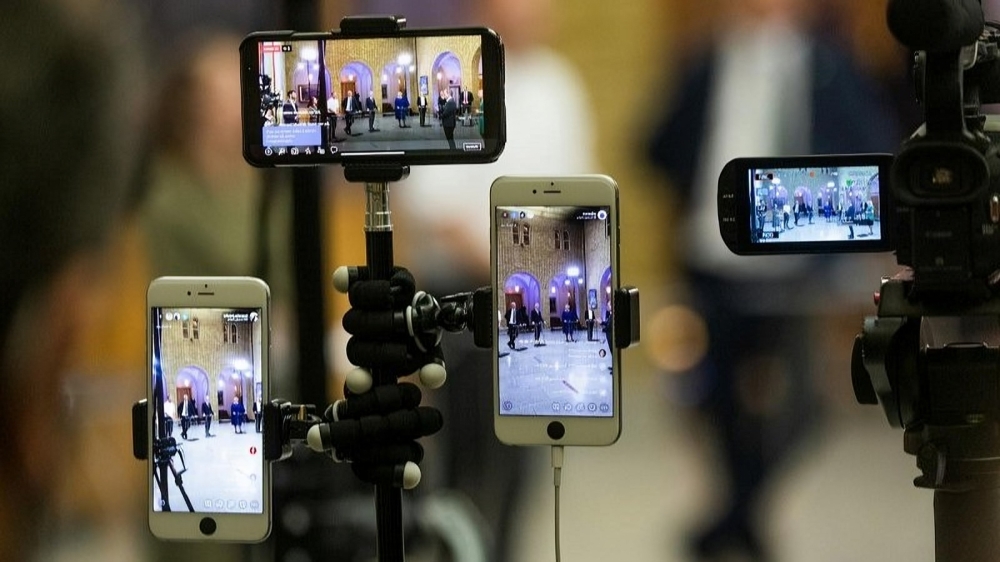
A multiview display, for example, allows the production operator to see several camera feeds and programme sources at the same time.
Instead of switching blindly, you can see what is available and choose the shot that best represents the moment.
The more complex the production becomes, the more valuable this visibility becomes.
Communication Also Matters
In larger productions, camera operators and the person controlling the broadcast should work as a team.
If communication is available, the director or switcher can prepare camera operators for upcoming shots, request particular framing or tell an operator when their camera is live.
Even where sophisticated intercom systems are not available, the principle remains important:
The cameras should not operate as completely separate units.
They are contributing to one programme.
Start With What You Can Manage
Someone learning professional livestreaming does not need to begin with six cameras.
Start with a setup you can understand and control.
Two or three cameras can already teach important skills: shot selection, camera positioning, switching, monitoring and anticipating what will happen next.
As your knowledge, experience and resources improve, you can gradually move into larger productions.
This follows the same principle I believe is important across professional livestreaming:
Knowledge should come before equipment.
Understanding why you are switching cameras is more important than simply having many cameras available.
Multi-Camera Production Is Visual Storytelling
Ultimately, multi-camera livestreaming is not about the number of cameras.
It is about using different visual perspectives to communicate what is happening as clearly and professionally as possible.
The production team needs to understand the programme, anticipate important moments and select shots with purpose.
From working with conference productions involving multiple cameras, one lesson stands out for me:
Do not change cameras randomly. Follow the event, understand what is happening, and let every camera change serve a purpose.
Continue exploring
More practical ideas and professional conversations.
 01
01 02
02 03
03
Join the conversation
Share a thoughtful response to this Insight.